Monday, January 21, 2013

PC Tips to transfer files with Wi-Fi


Hey fellas, this is a simple step by step procedure to transfer or share files from one PC to another through Wi-fi.

Just follow the steps given below.

1st of all, we need to create a Wi-fi AdHoc network in any of the PC.
A Wi-fi AdHoc network provides functionality for connecting two or more devices through Wi-fi.

For creating a Wi-fi AdHoc network, go to your Network and Sharing Center in the Control Panel. Click on Set up a New Connection or Network.

Sunday, January 13, 2013

PC Trick to test your Antivirus efficiency

Many a times our PC is threatened with virus attacks that our antivirus program does not detect.
Here is a simple solution to the above problem.
The below code checks whether our antivirus program is good at detecting viruses or is only a waste of time and money.

Open notepad and type the below code :

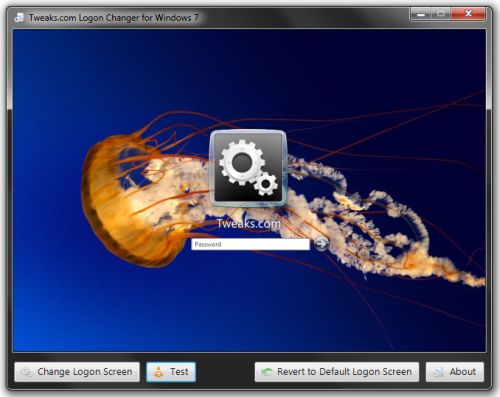
Awesome PC Trick to change the Windows Logon Screen

Microsoft supports customizing or creating your own desktops, screensavers, font types, sizes and many other things. This is an easy way to customize the Logon screen that appears during start up of windows.

Follow these simple steps :


Step 1: Open the Windows Start menu and enter regedit into the search bar.

Trick to enable PC God Mode


Hi freaks, sorry to keep you waiting so long. Anyways, here is the next post. This is a simple way to enable the God Mode of your PC.                                 Yes, that's right! God Mode! Microsoft Windows has enabled a GOD MODE so that PC users can tackle all the problems on their computers easily and with efficiency.                                                                                           All you need to do is create a new folder anywhere, and name it as follows :


God Mode.{ED7BA470-8E54-465E-825C-99712043E01C}

and press Enter.

The following transformation should take place ->


Open it, and you will see the following screen.


Now customize your PC performance your way. Good luck with that.

Post your comments below.

Monday, December 17, 2012

Trick to prevent your content from being copied

This is a simple way to disable the text selection and the right click functionality on a webpage. It helps webpage owners protect their original contents from being copied.

Although this is a temporary method, but comes handy when your website comes across visitors that intent to simply copy your content into their pages and call it theirs.

All you need to do is copy these JAVASCRIPT code into your webpage.

Wednesday, December 12, 2012

PC Tips - Very useful Blog Add-ons

Here’s a collection of some useful blog add-ons or extras that can be easily integrated with any website and may help in enhancing your visitors’ experience.

 All these add-ons are completely free and you don’t have to be a geek to use them on your site.


All these 15 add-ons are free and you don’t have to be a geek to use them on your site.

PC Tips - Steps to upgrade to Windows 8

Windows 8 Here is how you can upgrade your version of Windows XP, Vista or Windows 7 to Windows 8 Pro edition.


All the existing software programs work just fine in Windows 8 and the built-in Windows Store offers a plethora of new full-screen “apps” to choose from. 

Desktop search is so much better in Windows 8, the UI feels more snappy and the system will boot faster. You don’t need to install a separate anti-virus program as Windows Defender is already included in Windows 8.

PC Tips - Top 101 useful and interesting PC websites


These are some websites that may come handy solving user problems on PC. Well most of them solve at least one of your long awaited problems, and are also easy to remember with their simple URLs. Have a peek :


  • screenr.com – record movies of your desktop and send them straight to YouTube.
  • ctrlq.org/screenshots – for capturingscreenshots of web pages on mobile and desktops.
  • goo.gl – shorten long URLs and convert URLs into QR codes.
  • unfurlr.come – find the original URL that’s hiding behind a short URL.
  • PC Tips - Useful Windows utilities


    windows_utilities

    Hi freaks! Here are some very useful and important Windows utility softwares that help you work with your PCs more comfortably. Have a peek!

    These tools are free, light-weight and can be installed on all versions of Windows including the newer Window 8.

    1. Eraser – When you delete a file in Windows, the contents of the file can still be recovered using other utilities. Eraser lets you permanently delete a file making recovery nearly impossible.
    2. Unlocker – If you are trying to delete a file (or folder) but unable to do so because the “file is in use” by another program, just use Unlocker to end all the locking processes.

    Sunday, December 9, 2012

    PC Tips- Windows 7 or Windows 8?


    Windows 8 is the fastest Operating system ever developed by Microsoft till now. It can Boot in less than 8 seconds. This is incredibly fast compare to other version of Windows OS. We agree windows 7 is by far better version of Windows Vista. However Windows 8 looks to be better than Windows 7.

    The speed: The speed of Windows 8 is just incredible. It could be even faster than Google chrome operating system. In past people were annoyed with the slow booting time of the previous windows series. But now people are going to experience an amazing version of Windows OS. Don't believe us? Check out the below video for Speed Test -

    Trick to create a Stickman and have fun with it


    In this blog I will share another cool website where you can draw a stickman online and play with it. You can use this website in your borrrrrrringg time to have fun. Also share this with your friends to show them something new.
    As you can see in the above picture I have drawn a stickman and playing with it. The website will allow you to draw different stuff automatically. 

    Wanna check the site? Go to this Link to check it out

    PC Tips - Top 10 Time-Pass interesting websites


    Guyz, here are some of the best websites available on the internet that may be fun to explore in your spare time. Now, don't just keep sitting idle but have some fun! Enjoy!

    1) 9GAG: This is currently the most popular troll website  to have ultimate lough and fun. Many users publishing extremely funny content everyday. Sometimes I get very surprised to see the creativity and humor of the 9Gag users. 

    2) BreakThis is another great site for watching interesting funny photos and videos. You will find lots of funny pictures and videos to get rid of the Boringness. 

    3) FailblogYou must have heard about Failblog. This is one of the most popular website for watching real EPIC fail videos and photos.

    Trick to create trail for an image in MS-Paint


    Create a trail image


    1. Open Paint, then open an image.
    2. Right-click on the image and select "Select All"
    3. Now hold the "Shift" key and move the image around. The image will be drawn with trail.

    enJoy.

    Saturday, December 8, 2012

    Trick to do Batch programming in PC


    Guys, here are some DOS commands that you may learn and then you can handle BATCH programming with ease.

    DOS 6.22 internal commands DOS (Disk Operating System) has 2 type of commands.

    Internal DOS Commands.
    External DOS Commands.

    In this article I am going to explain only DOS 6.22 internal commands. DOS 6.22 based on 3 files.

    Config.sys
    Command.com
    Io.sys

    Trick to install Windows XP in less than 15 minutes


    Now, this tip will be very helpful for those who frequently install windows xp operating system. Normally OS installation takes around 40 minutes to complete, but through this trick you can now save 10-15 minutes. This simple tricks goes this way.

    1. Boot through Windows XP CD.

    2. After all the files are completely loaded, you get the option to select the partition. Select “c”.

    3. Now Format the partition, whether it is normal or quick with NTFS or FAT

    4. Once the formatting is completed, All the setup files required for installation are copied. Rest

    PC Tips - Shopping coupons available for free


    Coupon and promo codeWhen purchasing anything online make sure to search for a coupon or promo codes before finalizing the purchase. Searching for coupons can take less than a few minutes to find and can save you on shipping or the overall cost of the purchase. When entering your payment information almost all sites will have an empty box for a coupon or promo code

    Top 10 Windows 7 tips for PC

    Windows 7 keyboard shortcuts


    Use the below Windows 7 keyboard shortcuts to make the most of your Windows 7 experience.

    Windows key and the arrow keys


    Pressing the Windows key and Left or Right arrow keys will dock the window your viewing to the left or right-hand side of the screen. Pressing the Windows key and the Up arrow will maximize a window and pressing the Windows key and the Down arrow will resize and then minimize the window.

    Friday, December 7, 2012

    Trick to check your PC is male or female


    This is really a funny trick, guys. Now you can know the gender of your computer that is male or female. Just follow the step: (Note: you must have speaker or headphone)


    your computer male or female


    ♦  Open a Notepad and paste the following codes in to that file.  


    PC Trick to hide a drive in My Computer


    About hiding a drive from computer.

    Why we have to do this?


    In our home all our friends and family members can use our computer. So its not a safe environment for your personal files. So we have to hide that from them. After doing this trick the specified partition is hidden from my computer and nobody knows there is one another partition there. So you can use that partition for your own personal only.

    How to do this?


    Trick to Hide your Private FOLDERS in PC


    This is a simple trick to hide some folder for your private files, but this is not the step by any batch programming. Just follow the steps:

    Step 1 : Create a folder in any drive on your computer and copy your private files to that folder.

    Step 2 : Right click that folder and select “Rename” then hold “Alt” key and type “0160” (don’t release alt key till the four letter typed “ALT + 0160”) .

    Its only working on num keyboard guys please note this